
Open the Products report in a mature Google Ads account, click one of the best-selling items, and look at the list of campaigns that can show it. In a clean account there is one. In many scaled accounts there are two, three, or four, each with its own budget and its own target, and nobody decided that on purpose. That is Performance Max product overlap, and it was the core problem in this hardware account.
Short version: A USA hardware brand had multiple Performance Max campaigns fighting over the same products. We re-segmented so every product had one clear home, rebuilt weak non-branded campaigns, and grew revenue 40% to $85K/month even as CPCs rose 31% year over year. Below is what we did, followed by a practical guide to finding and fixing Performance Max product conflicts in your own account.
One of the most common and most invisible problems in scaled accounts is internal competition: two of your own campaigns claiming the same products, so the account ends up competing with itself. This hardware brand had exactly that, plus historically weak non-branded campaigns dragging on results.
The situation
A USA hardware company selling screws and construction products had internal product conflicts across multiple Performance Max campaigns, historically weak non-branded campaigns, and low visibility on certain products. They were effectively competing with themselves.
What we actually did
- Re-segmented so each product had one home. We restructured campaigns so every product was uniquely positioned in its own campaign, removing the internal conflicts that were inflating costs.
- Rebuilt non-branded from the data. Using past-data analysis, we rebuilt the historically weak non-branded campaigns to reach a 2.8x ROAS.
- Exposed hidden products and added DSA. We launched new campaigns for under-exposed products plus a Dynamic Search Ads campaign that delivered over 2x ROAS, capturing demand the account had been missing.
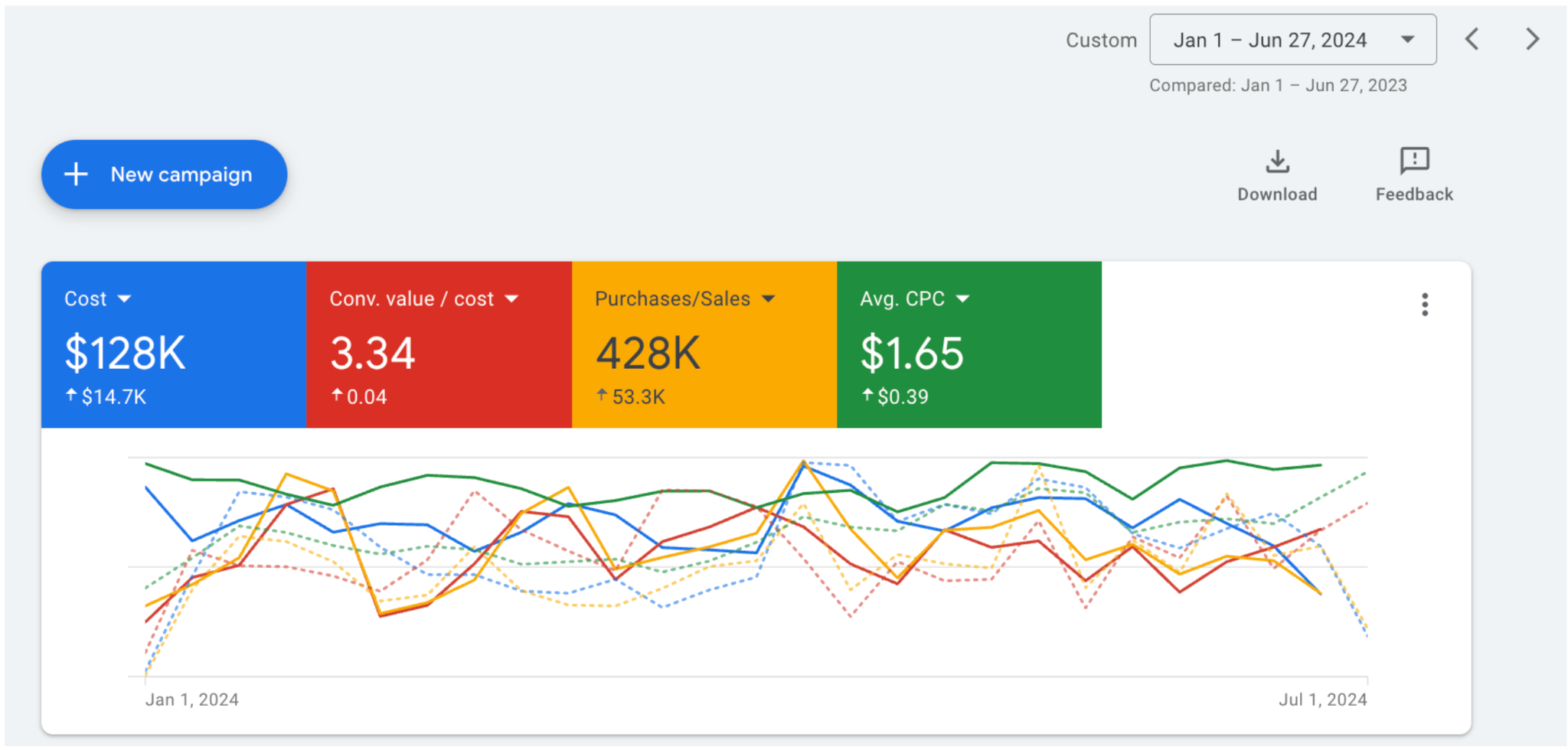
The results
- Started Apr 2023 at ~$60K/month revenue, growing to over $85K/month by May 2024 (+40%).
- Jan to Jun 2024: +14% revenue vs. prior year despite a 31% YoY average CPC increase from rising competition.
- $128K spend at a 3.34x conversion value/cost ratio.
The rest of this page explains the tactics behind those results in general terms, so you can check whether the same problems exist in your account and fix them yourself.
What Performance Max product overlap actually is
Performance Max product overlap happens when the same product can be served by more than one campaign in the same account. It usually builds up over time: a campaign for bestsellers is added on top of an all-products campaign, a seasonal campaign is launched without excluding those items elsewhere, or a Standard Shopping campaign is kept running next to a new Performance Max campaign. Each change makes sense alone. Together they leave products with several possible homes.
How Google decides which of your campaigns serves
Google does not run a separate bidding war between your own campaigns for every search. When several campaigns in one account are eligible for the same impression, Google's documentation says the one with the higher Ad Rank gets priority. Since late 2024 that rule also covers Performance Max and Standard Shopping: if both target the same products in one account, the campaign with the higher Ad Rank serves, where previously Performance Max was automatically prioritized. So the question is not whether your campaigns can compete for the same product. It is whether the campaign that wins is the one you wanted.
Why overlap still costs money
Even without a literal bid war, Performance Max product overlap is expensive in quieter ways:
- The wrong target serves. A product you wanted at a strict ROAS target may be served by a looser campaign that bids more freely, which raises what you pay for the same sale.
- Conversion data splits. Each campaign learns from a fraction of the product's sales, so neither builds a strong signal, and Smart Bidding works with thinner data than it needs.
- Budgets stop meaning anything. Raising one campaign's budget may just move sales from a sibling campaign, which is why budgets in overlapping accounts often fail to produce more sales when increased.
- Reporting becomes unreadable. When the same products sit in several campaigns, you cannot say which structure or target is working.
Signs your PMax campaigns are competing with each other
The symptoms are consistent across accounts: rising CPCs with flat conversions, budget increases that do not produce more sales, impression share that swings between campaigns that should not overlap, and one campaign's revenue falling whenever another is scaled. None of these proves overlap alone, but two or three together are a strong reason to check.
How to find Performance Max product overlap, step by step
- Start in the Products report. In Google Ads, open the products view for the account, sort by cost, and click your top sellers. The detail view shows which campaigns include each product, which is the quickest way to spot duplicates.
- Read the listing groups in every Performance Max campaign. Note how each campaign and each asset group filters products: by brand, product type, custom label, item ID, or all products. An asset group set to all products overlaps with everything.
- Check Standard Shopping too. List the product groups in every Shopping campaign and compare them with the Performance Max filters.
- Look for catch-all groups. "Everything else" groups and all-products campaigns are the most common source of hidden overlap, especially after new campaigns are added on top.
- Write the map down. A simple sheet with each product segment in one column and every campaign that can serve it in the next makes the conflicts obvious.
How to fix Performance Max product overlap: one home per product
Re-segment so each product or product group is uniquely positioned in a single campaign. This removes the overlap immediately and gives you clean, attributable performance per product group. It is unglamorous structural work, but it is often the highest-ROI change you can make in a mature account.
Choose a segmentation that matches how you make money
| Segment by | Good for | Watch out for |
|---|---|---|
| Custom label (margin band) | Setting targets that match profit per product | Labels must be kept up to date in the feed |
| Custom label (performance tier) | Separating proven sellers from untested items | Products need to move between tiers over time |
| Product type or category | Clear reporting by range | Categories with very different margins mixed together |
| Brand | Stores that resell several brands | One brand can still hold mixed-margin products |
| Item ID | A handful of hero products | Hard to maintain at catalog scale |
Merchant Center gives you five custom label attributes, custom_label_0 to custom_label_4, which is usually enough to hold margin band, price band, performance tier, and season. Whatever you choose, the rule is the same: every product appears in exactly one campaign's filters, and every campaign excludes what the others include.
Split or consolidate?
Split into more campaigns when
- Product groups have clearly different margins
- Each group has enough conversions for Smart Bidding
- You need separate budgets for seasonal ranges
Consolidate when
- Campaigns are starved of conversion data
- Targets are the same across campaigns anyway
- The split exists for no reason anyone remembers
Overlap is often fixed by consolidating, not by adding campaigns. If two Performance Max campaigns share a target and a margin profile, merging them gives one campaign the full data set. If they need different targets, separate them cleanly with exclusions.
Change structure in steps
Moving many products between campaigns at once resets learning across the account. Move one segment at a time, give each move a week or two, and keep budgets steady while the new structure settles so you can tell which change caused what.