Portable Power Google Ads Case Study: £4K in 14 Days
Vasant Chaudhary
Google Ads specialist. $30M+ managed across 50+ e-commerce and agency accounts in the US, UK and India. Book a free audit call
On this page
A new UK brand selling portable power products had a website, a product range and no Google Ads history at all. No past campaigns, no conversion data, nothing for the bidding to learn from. The usual advice for an account like that is to expect a slow first month or two while it "warms up". The brand needed sales and data sooner than that.
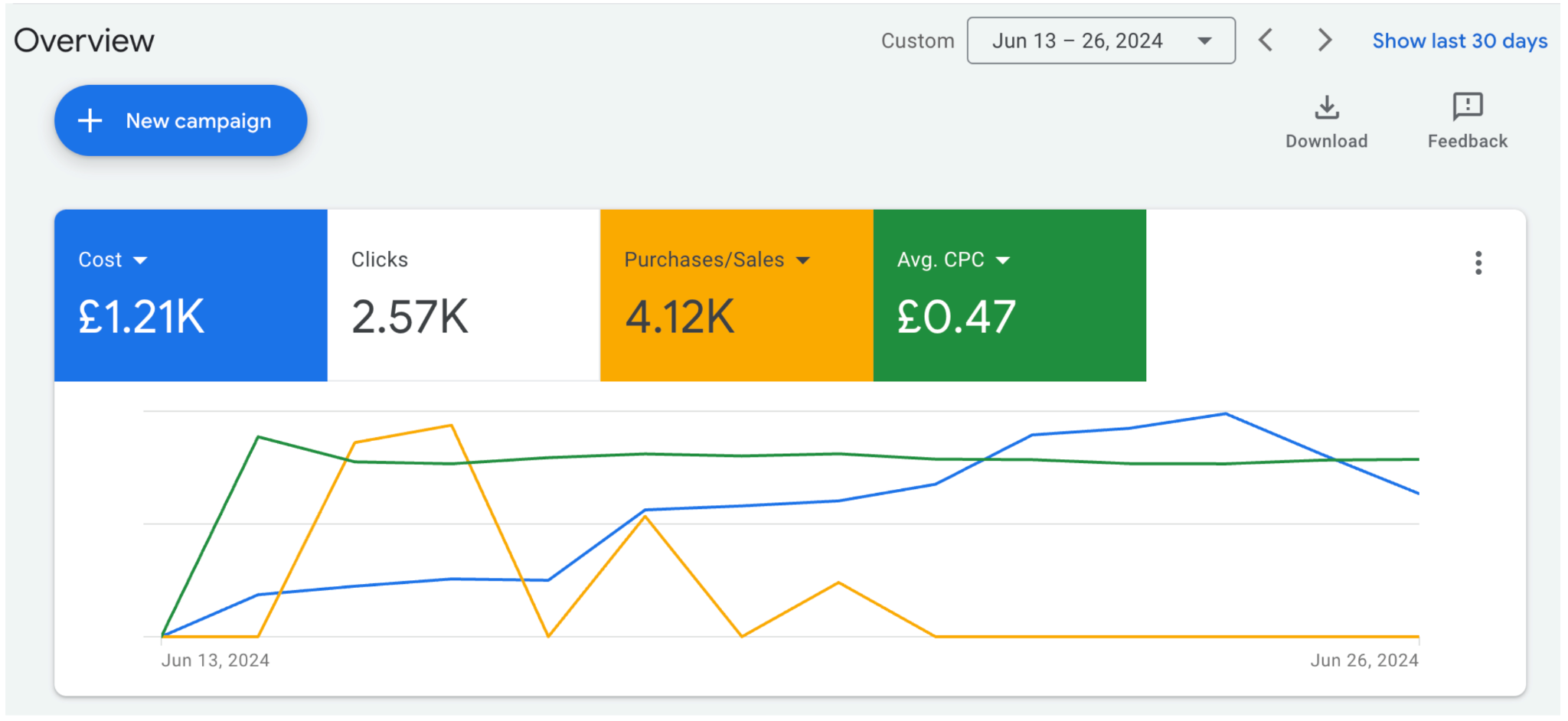
Short version: This portable power Google Ads case study shows how a brand-new account produced £4.12K in purchases from £1.21K in spend in its first 14 days (13 to 26 June 2024), from 2.57K clicks at an average CPC of £0.47. Three things made it fast: research before any spend, a simple launch structure of Search Brand, Non-Branded Search and Standard Shopping, and counting add-to-carts alongside purchases as conversions early on so Smart Bidding had more signals to learn from. Below is exactly what we did, why, and how another new store can copy it.
The portable power brand is not named; we never name clients in a Google Ads case study. Every number below comes from the account screenshot shown in the results section.
Portable power Google Ads case study at a glance
14 daysFrom launch of a brand-new account to the results below
£4.12KPurchases / sales value in the first two weeks
£1.21KTotal spend over the same 14 days
£0.47Average CPC across 2.57K clicks
The starting situation in this Google Ads case study
A brand-new account with nothing to learn from
The brand had no Google Ads history. That matters more than most store owners expect. Smart Bidding works by predicting which searches are likely to convert, and it makes those predictions from past conversions. A new account has none, so in the first weeks the system is close to guessing, and many new accounts spend their first month buying data rather than sales.
What the brand needed from the launch
Three things: a fast presence on Google for its products, early sales, and enough data to make good decisions in the months after launch. Those three goals shaped every choice below. The launch had to be simple enough to gather data quickly, and specific enough to sell from day one.
Why new Google Ads accounts are usually slow
It helps to understand why the warm-up period exists before trying to shorten it.
No conversion history. Bidding has nothing to learn from, so early bids are rough.
Too many campaigns. A modest budget spread across many campaigns means none of them reach the volume they need to learn.
Decisions made on assumptions. Accounts launched without research spend weeks discovering what the competition and the site could have told them on day one.
Purchases are rare at first. Even a good new store may see only a few sales a week at launch, which is a thin signal for any algorithm.
The launch in this Google Ads case study was designed to deal with each of these.
What we did in this new Google Ads account, step by step
Research before spend. We analysed the website and researched competitors before a single campaign went live, so keywords, products and ad copy were built on the brand's real positioning rather than guesses.
A structured launch. We launched three campaigns: Search Brand, Non-Branded Search and Standard Shopping. This is the foundation we use for most new ecommerce accounts.
More conversion signals, early. We included add-to-carts alongside purchases as conversion actions from the start, so Smart Bidding had many more data points to learn from in the first days.
Why research comes before the first click
Competitor research shows which terms rivals bid on, how they price, and what they promise in their ads. Website analysis shows which products and pages are ready to receive paid traffic and which are not. Doing that work up front means the first two weeks of spend test good ideas instead of discovering obvious problems.
Why Search Brand on a brand-new brand
Even a new brand gets searched by name once people see it anywhere: on social, in a marketplace listing, by word of mouth. A small brand campaign makes sure those people find the brand's own site first, cheaply, and gives clean data on brand demand from day one.
Why Standard Shopping and Search rather than one PMax campaign
Performance Max can work well once an account has conversion history, but at launch it has little to learn from and gives you limited visibility into what it is doing. Standard Shopping and Search give clear, query-level data from the first day: which products get clicks, which search terms convert, what each costs. That data is exactly what a new account needs, and it makes a later move to PMax better informed. Our comparison of PMax vs Shopping vs Demand Gen explains where each fits.
Why add-to-carts as conversions at launch
A new store might make a few sales a day at first. It will see many more add-to-carts. Counting those alongside purchases during launch gives Smart Bidding several times more signals to learn which searches and products attract buying intent. The trade-off is that bidding now values add-to-carts as well as sales, so this is a launch setting, not a permanent one.
Remove the training wheels on time
Once the account has steady purchase volume, take add-to-cart out of the conversion goal used for bidding and optimise on purchases only. Leave it in too long and bidding will happily buy cheap add-to-carts from people who never check out.
The results of the portable power Google Ads case study
Google Ads account overview - first 14 days
This is the evidence behind the portable power Google Ads case study. The screenshot covers 13 to 26 June 2024, the first 14 days of the account.
Metric
First 14 days
Cost
£1.21K
Clicks
2.57K
Purchases / sales value
£4.12K
Average CPC
£0.47
Over £4,000 in purchase value in the first two weeks of a brand-new account.
Purchases alone returned more than 3x the ad spend in that period, before any optimisation history existed.
An average CPC of £0.47 across 2.57K clicks, which gave the account a meaningful amount of traffic data to work from by the end of week two.
Read new-account numbers honestly
When add-to-carts count as conversions, the "Conversions" and "Conv. value" columns in Google Ads include them, so the account can look stronger than its sales are. Judge a launch like this on the purchases column, as we have done above, and keep the add-to-cart numbers for what they are: learning signals.
How to accelerate a new account's learning phase
The reason this account produced sales in 14 days comes down to how quickly it gathered usable data. Here is how to compress that timeline safely.
Feed the algorithm more signals early
A brand-new account has zero conversion history, so Smart Bidding is essentially guessing. Counting earlier-funnel actions like add-to-cart alongside purchases during the launch phase gives the system far more data points to learn from. Once the account has enough purchase volume, tighten back to purchase-only optimisation.
Do not split a small budget too thin
A common launch mistake is spreading a modest budget across too many campaigns and ad groups. Each one then starves for data and none reach the conversion volume Smart Bidding needs. Three campaigns was enough here. Concentrate your launch budget so the campaigns that matter actually build up signal.
Front-load the research, not the guesswork
Speed in the live account comes from work done before launch. The accounts that take months to find traction are usually the ones launched on assumptions and corrected later.
Check tracking before you spend a penny
None of this works if purchases and add-to-carts are not recorded correctly. Place a test order and add a test item to cart before launch, and confirm both appear in Google Ads. If you run on Shopify, our guide to Shopify Google Ads conversion tracking covers the setup.
Cautious launch vs structured launch
Typical cautious launch
Goes live quickly with little research
One PMax campaign or many small campaigns
Purchases only, so very few early signals
First useful data arrives in month two
Early weeks spent fixing obvious problems
Structured launch used here
Website and competitor research before spend
Search Brand, Non-Branded Search, Standard Shopping
Add-to-carts plus purchases as early conversions
Query and product data from day one
£4.12K in purchases inside 14 days
What other new stores can copy from this Google Ads case study
You do not need to sell portable power products for this Google Ads case study to apply to you. The same launch works for most new ecommerce accounts with a clear product range.
Do the research first. Spend a few days on the site and competitors before you spend anything on clicks.
Launch with three campaigns, not ten. Search Brand, Non-Branded Search and Standard Shopping cover brand demand, category demand and product demand.
Add add-to-cart to the conversion goal for the launch only, then remove it once purchases are steady.
Judge the launch on purchases, not on total conversions.
Use the first weeks' search terms and product data to decide what to scale, what to cut and whether to add Performance Max later.
The approach in this portable power Google Ads case study fits best if most of these are true:
Your Google Ads account is new, or has no meaningful conversion history.
You sell physical products with a working Merchant Center feed.
You need early sales, not just awareness, from the first month.
Your budget is modest, so it needs to be concentrated rather than spread.
Your purchase and add-to-cart tracking can be tested before launch.
You are willing to change the conversion setup once purchase volume builds.
Frequently asked questions
How fast can a new Google Ads account make sales?
Faster than the usual "wait a month" advice suggests, if it is set up for it. In this Google Ads case study, a brand-new UK account produced £4.12K in purchases from £1.21K in spend in its first 14 days. The keys were research before launch, a simple Search plus Shopping structure, and counting add-to-carts alongside purchases early so Smart Bidding had more signals.
Should I use add-to-cart as a conversion in Google Ads?
For a short launch period on a new account, it can help, because it gives Smart Bidding many more signals than purchases alone. Once purchases are steady, remove add-to-cart from the conversion goal used for bidding and optimise on purchases only. Leaving it in long term can push bidding toward people who add to cart but do not buy.
Should a new ecommerce store start with Performance Max or Shopping?
For most new stores, Standard Shopping plus Search Brand and Non-Branded Search is the safer start. They give clear query and product data from day one, which a brand-new account needs. Performance Max can be added once the account has conversion history to learn from.
What budget does a new Google Ads account need?
Enough to give a small number of campaigns real traffic, rather than a fixed figure. This launch spent £1.21K over 14 days across three campaigns and drew 2.57K clicks. The more important rule is concentration: fewer campaigns with enough budget learn faster than many campaigns with a little each.
Why does my new Google Ads account show conversions but few sales?
Usually because other actions, such as add-to-cart, are counted as conversions. Check the conversion action breakdown and read the purchases column on its own. That is the true sales number, and the one to judge a launch on.
What this Google Ads case study means for your store
A new account does not have to lose money for a month before it works. Research before you spend, launch with a proper Search plus Shopping structure rather than a scatter of campaigns, give the algorithm extra conversion signals early so it learns faster, and judge the result on purchases. Speed comes from structure, not from spending more. You can see this portable power Google Ads case study alongside our other results on the case studies page.